
Vehicle inspections just got a whole lot faster. QR Codes let your drivers walk up to any vehicle, scan a sticker with their phone, and jump straight into the inspection — no scrolling through a vehicle list, no typing, no guessing which truck is which.
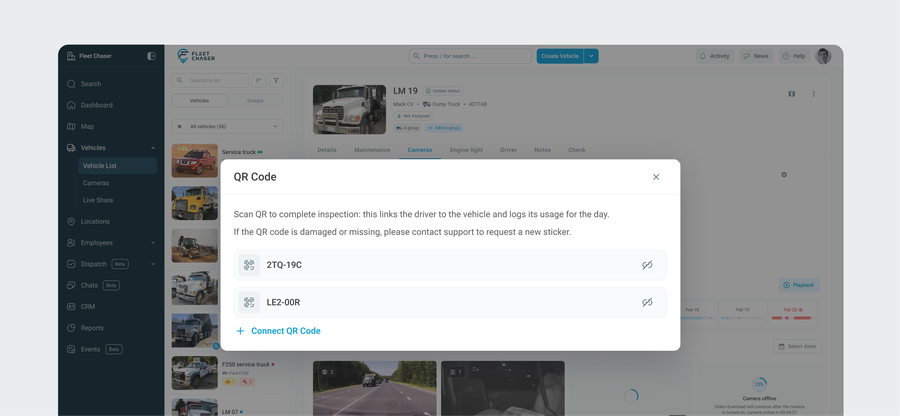
It's built into both the Employee App (scan and inspect) and the Console (link a code to a vehicle in seconds), so the whole flow — from sticking a code on a truck to reviewing the check — stays inside Fleet Chaser.
🚛 For Drivers: One Scan, Right Into the Check
No searching. No wrong vehicle. Just point and scan:
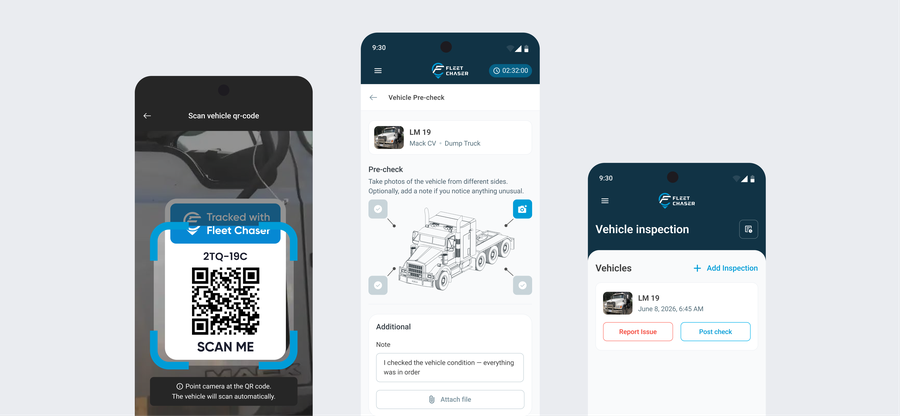
- Scan to inspect — open the app, scan the QR sticker on the vehicle, and the right inspection opens instantly. No hunting through a list to find the truck you're standing next to.
- The right check, automatically — at the start of the day a scan opens the pre-check; at the end of the day the same scan opens the post-check. The app keeps track, so the driver doesn't have to.
- Your own flow on shared vehicles — when a truck is shared across a shift, every driver gets their own inspection. One person scanning never wipes out someone else's check.
🧭 For Managers: Set It Up in Seconds
Getting a vehicle QR-ready is quick, and it all happens in the Console:
- Link a code from the Vehicle page — scan the sticker from your phone to connect it to the right vehicle (or enter the code by hand). No long codes to type out.
- See what's connected at a glance — each vehicle clearly shows whether it already has a QR code linked, so nothing slips through during setup.
- Cleaner, more reliable records — because drivers scan the actual vehicle, every inspection is tied to the right truck — better records, fewer mistakes, less back-and-forth.
🏷️ Getting Started
- Get your QR stickers — durable vinyl stickers built to live on a vehicle. (We can help you order a set.)
- Put one on each vehicle — somewhere easy to reach, like the door or the dash.
- Link it in the Console — open the vehicle, scan the code, done.
- Tell your drivers to scan — from then on, every inspection starts with a scan.
Why It Matters
Inspections only get done when they're easy. Every second a driver spends finding the right vehicle in a list is a second they're not working — and a reason to skip the check altogether. QR Codes take that friction out: walk up, scan, inspect, go. You get more complete inspections, tied to the right vehicle, with less effort from everyone.
🔮 Where QR Could Go Next
QR Codes are just getting started. A sticker is a simple thing, but it's a doorway into a vehicle — and there's a lot more we could open up from a single scan. Here's where our heads are at (these are directions we're exploring, not promises):
- Scan to see the whole vehicle, not just the inspection — one scan could pull up a vehicle's full picture: open issues, recent activity, and what needs attention while you're standing right next to it.
- Made for mechanics — a mechanic could scan a vehicle and immediately see the open problems and maintenance tasks for it, then log the work they did against the right vehicle — no digging.
- Beyond vehicles — equipment and tools — the same idea could extend to equipment and tools, so you can keep track of who took what and when it came back.
- Know who has what, right now — a quick scan to check a vehicle or a tool out and back in, so it's always clear who's responsible for it.
None of this is set in stone — it's the thinking behind where QR goes from here. If one of these would make a real difference for your crew, tell us; that's how we decide what to build next.
Rolling out now — make sure your team updates to the latest version of the Employee App from the App Store or Google Play.
Want QR codes on your fleet? Drop us a note in the chat or message support — we'll get you set up with stickers and walk you through it.