



VINs / 1999 / Peterbilt / 567 / 1XPCDU9X9XD426103
1999 Peterbilt 567
Vin:
1XPCDU9X9XD426103
Type:
Truck-Tractor
Year:
1999
Make:
Peterbilt
Model:
567
GVWR:
?

Engine
Manufacturer
Caterpillar
Model
C12/C13
Drive Trian
Type
6x4
Manufacturer
Manufacturer
PETERBILT MOTORS COMPANY
Plant Company
Peterbilt
Plant City
DENTON
Plant State
TEXAS
Plant Country
UNITED STATES (USA)
Safety Features
Brake System Type
Air
Do you manage a fleet?
FleetChaser will help you track:
- Mileage and maintenance
- Filling and expenses
- Real-time technical condition
Learn More
You'll never want to go back to how your fleet operated before Fleet Chaser
Our construction fleet management software makes your fleet management better, safer, and easier.
Construction and Fleet Management Articles

What does it take to develop a fleet management budget that will support you on the way to your business goals? In this short guide will cover the determining aspects you should keep in mind and strategies to employ when drawing up a fleet budget.
But first, let’s clarify — why is it imperative to have one? 🤔

If you manage a large enterprise fleet with hundreds of vehicles, you face the daunting challenge of optimizing operations every day. Your fleet is a critical resource; however, costs can grow exponentially if the right approach isn’t applied. Hence, achieving efficiency is a top priority. The good news is that fleet management software can be your ally in streamlining operations and maximizing productivity.

Live Share update: share a vehicle by link and let your customer see not just the live map, but the route history for the exact days you worked their site.
![[Fleet Chaser] Fleet Management Software Features - Preview](https://cms-media.fleetchaser.com/images/Fleet_Chaser_Fleet_Management_Software_Featu.max-320x320.png)
As of December 2024, there are 968 fleet management software (FMS) options listed on Capterra alone. Think of going through dozens of them, hoping to find the perfect fit for your fleet. You spend days, maybe weeks, swamped by endless features and specs, sitting through overhyped demos, and feeling your brain turn to mush.

Geofencing leverages GPS or RFID technology to establish virtual perimeters around physical locations, granting fleet managers meticulous control and invaluable insights. It addresses concerns such as driver behavior monitoring, unauthorized asset use prevention, streamlined administrative tasks, load counting, and improved safety compliance. To gain a comprehensive understanding of the tangible benefits geofencing offers, let's delve deeper into its functionality.

Managing a fleet isn’t just about tracking dots on a map. It’s about knowing exactly what’s happening — and reacting before small issues become big problems. That’s why we rebuilt and expanded the Fleet Chaser Events System. Now, with a cleaner interface and more flexible rules, Events is open to every Fleet Chaser customer.

The most critical components of a fleet are the drivers and the vehicles. It is important that good driving behavior is monitored and encouraged, and fleets are kept safe.. Dash cameras make it possible to catch irresponsible driving early, provide concrete evidence in the event of an accident, and, most importantly, avoid them.

Managing multiple companies can be a challenge, especially when you constantly need to log in and out of different accounts. Previously, Fleet Chaser users were limited to managing just one company at a time. If you worked for more than one company, switching between them required logging out and logging in again, which was time-consuming and inconvenient.
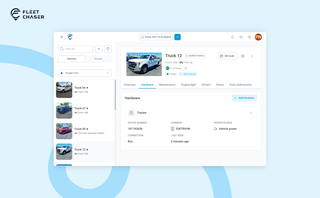
A vehicle now goes into Fleet Chaser in one step, before its tracker arrives. The new Hardware tab connects the tracker or camera later, and the Driver card can check a driver out.