



VINs / 1999 / American Lafrance / Eagle / 4Z36ESEB0XRA41419
1999 American Lafrance Eagle
Vin:
4Z36ESEB0XRA41419
Type:
Fire Apparatus
Year:
1999
Make:
American Lafrance
Model:
Eagle
GVWR:
?
Engine
Model
S60
Fuel
Diesel
Horse Power
408
Displacement(Liters)
12.7
Cylinders
6
Cycles
4
Configuration
In-Line
Drive Trian
Type
4x2
Manufacturer
Manufacturer
AMERICAN LAFRANCE, LLC
Plant Company
ALF
Plant City
CLEVELAND
Plant State
NORTH CAROLINA
Plant Country
UNITED STATES (USA)
Safety Features
Brake System Type
Air
Do you manage a fleet?
FleetChaser will help you track:
- Mileage and maintenance
- Filling and expenses
- Real-time technical condition
Learn More
You'll never want to go back to how your fleet operated before Fleet Chaser
Our construction fleet management software makes your fleet management better, safer, and easier.
Construction and Fleet Management Articles

Compare 8 dispatch platforms for US construction fleets — features, pricing, and which fits a 10-vehicle vs 50+ fleet. Includes Samsara, Fleetio, Procore.

Unexpected downtime presents a tangible setback for your fleet. Not only is your asset now off the road, but you have to tweak your operations and allocate finances to accommodate for it.

You’ve got all this data coming from your fleet vehicles on maintenance, fuel, and mileage, but it feels like navigating through a maze with no map to guide you. You know tracking the right fleet metrics is crucial, but where do you even begin and what really matters? Read this article to learn about the key KPIs that tell you whether your fleet is on track or heading for trouble.

Fleet Chaser chat keeps every conversation right next to the routes, tasks, and time clock your team already works in. Over the past few months we've made it clearer to use and steadier out in the field — reply to specific messages, share files with cleaner previews, and stay connected even when the signal drops.

Geofencing leverages GPS or RFID technology to establish virtual perimeters around physical locations, granting fleet managers meticulous control and invaluable insights. It addresses concerns such as driver behavior monitoring, unauthorized asset use prevention, streamlined administrative tasks, load counting, and improved safety compliance. To gain a comprehensive understanding of the tangible benefits geofencing offers, let's delve deeper into its functionality.

Time Approval now opens a full Session Details view of every shift before you sign off, and the new Pay Period screen turns approved hours into a click-to-pay workflow. Together they cover the whole stretch from clock-out to paycheck — without leaving Fleet Chaser.
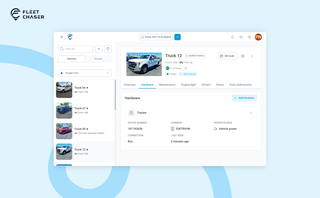
A vehicle now goes into Fleet Chaser in one step, before its tracker arrives. The new Hardware tab connects the tracker or camera later, and the Driver card can check a driver out.

Discover our major updates to the Dash Camera section, designed to streamline your fleet management:
- Enhanced Camera Interface: Enjoy an updated design with a new timeline feature for easy video status tracking.
- Improved Live Section: Clearer status indicators for real-time camera monitoring.
- Upgraded Saved Media Section: Organized media tabs and date sorting for effortless access to your recordings.
Explore these new features for a more efficient fleet management experience.

Idle fleet vehicles draining money, drivers taking hour-long detours to lunch, traffic jams derailing schedules, maintenance issues snowballing into bills with multiple zeros… If you’re nodding along to these fleet management issues, you’re not alone.