



VINs / 1999 / Peterbilt / 567 / 1XPCDR9X3XN470606
1999 Peterbilt 567
Vin:
1XPCDR9X3XN470606
Type:
Truck-Tractor
Year:
1999
Make:
Peterbilt
Model:
567
GVWR:
?

Engine
Manufacturer
Detroit
Model
Series 60
Fuel
Diesel
Horse Power
330
Displacement(Liters)
11.1
Cylinders
6
Cycles
4
Configuration
In-Line
Drive Trian
Type
6x4
Manufacturer
Manufacturer
PETERBILT MOTORS COMPANY
Plant Company
Peterbilt
Plant City
MADISON
Plant State
TENNESSEE
Plant Country
UNITED STATES (USA)
Safety Features
Brake System Type
Air
Do you manage a fleet?
FleetChaser will help you track:
- Mileage and maintenance
- Filling and expenses
- Real-time technical condition
Learn More
You'll never want to go back to how your fleet operated before Fleet Chaser
Our construction fleet management software makes your fleet management better, safer, and easier.
Construction and Fleet Management Articles

In 2025, fleet owners face rising costs, pressure from the competition, and stricter regulations. The key to staying ahead is to adapt, not just follow every trend out there. We’ve picked 5 main fleet management trends to help you keep your operations more efficient and competitive. Ready to improve your fleet more? Check out these insights.

We are excited to introduce Fleet Chaser Chat, a brand-new feature designed to enhance communication and collaboration within your company. Whether you're coordinating fleet operations, managing employees, or discussing important updates, our chat functionality is built to support your needs.

Managing a fleet has never been more challenging. Rising insurance premiums, unpredictable fuel costs, and growing maintenance costs combined with the need to keep equipment running efficiently on tight schedules…
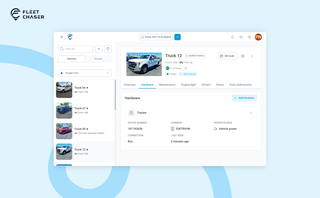
A vehicle now goes into Fleet Chaser in one step, before its tracker arrives. The new Hardware tab connects the tracker or camera later, and the Driver card can check a driver out.

Fleet management can feel like a truckload of troubles no one wants to deal with. As the team behind Fleet Chaser, we talk to fleet managers daily, dive into the latest reports, and help fleet businesses tackle their common challenges. In this article, we break down the biggest pain points fleet operators face and how the experts solve them. Read on!

Setting up a real job takes a few minutes — a route, products, a crew, a schedule. Get interrupted halfway and that half-built task used to be gone. Drafts fix that: while you build a task, Fleet Chaser saves it automatically, so you can step away and pick up exactly where you left off. A draft stays private and silent — no task number, no notifications — until you press Create task.

Hi folks! Let us brighten up your mood :)
We're excited to introduce Live Share, enabling real-time sharing of vehicle information with your customers.
Customers in the dark about their delivery? Customers don’t know where the truck is? Partner companies can’t access vehicle status? These are hurdles of the past!
With Live Share, you can now effortlessly share your vehicles with customers, partners, and colleagues in a secure and customizable manner.

You know where your vehicle is. But do you know what's happening around it?
That's why we introduced the Cameras Overview tab in Fleet Chaser. Now, dispatchers, safety managers, or operations leads can quickly see exactly what's going on - directly through the cameras installed in your vehicles.

We’re excited to announce that Fleet Chaser will be at the Charlotte Build Expo 2024 on December 11-12 at the Charlotte Convention Center. This is your chance to connect with us in person and learn how we’re helping SMBs in the construction industry take control of their fleet operations.