



VINs / 2007 / Kenworth / T8 Series / 1XKDDB9X37J190029
2007 Kenworth T8 Series
Vin:
1XKDDB9X37J190029
Type:
Truck-Tractor
Year:
2007
Make:
Kenworth
Model:
T8 Series
GVWR:
?

Engine
Manufacturer
Caterpillar
Model
3406/C15/C16
Fuel
Diesel
Horse Power
465
Displacement(Liters)
14.6
Cylinders
6
Cycles
4
Configuration
In-Line
Turbocharged
Yes
Drive Trian
Type
6x4
Manufacturer
Manufacturer
KENWORTH TRUCK COMPANY
Plant City
CHILLICOTHE
Plant State
OHIO
Plant Country
UNITED STATES (USA)
Safety Features
Brake System Type
Air
Do you manage a fleet?
FleetChaser will help you track:
- Mileage and maintenance
- Filling and expenses
- Real-time technical condition
Learn More
You'll never want to go back to how your fleet operated before Fleet Chaser
Our construction fleet management software makes your fleet management better, safer, and easier.
Construction and Fleet Management Articles

We are excited to introduce Fleet Chaser Chat, a brand-new feature designed to enhance communication and collaboration within your company. Whether you're coordinating fleet operations, managing employees, or discussing important updates, our chat functionality is built to support your needs.

Keeping your trucks on the road means keeping your business running. A single defect can pose a major setback to your fleet, sacrificing time, money, and customer satisfaction. “Prevention is better than cure” applies here pretty much.
That’s why extending the lifetime of your trucks boils down to preventive maintenance: knowing what type of issues are likely to arise and addressing them early on.
Take a proactive approach to your truck’s upkeep and find out how to avoid the five most common breakdown causes.

The last activity view is already in your account. This feature enables you to instantly view info on trucks’ activity in certain locations. No need to search info on the last activity manually: it will be displayed neatly right next to each location’s name. Stay updated and have a nice day ahead!

Fleet management requires the handling and analysis of numerous metrics and variables, which can quickly get out of hand and clutter your desk with piles of hard-to-access information. Compiling reports, communicating with employees, contractors, and drivers, etc., should be intuitive, all laid out in a simple, visual way.
This is where fleet management software comes in.

Managing a fleet has never been more challenging. Rising insurance premiums, unpredictable fuel costs, and growing maintenance costs combined with the need to keep equipment running efficiently on tight schedules…

You shouldn't have to stop and figure out where to look for something in Fleet Chaser. You should be able to type its name and be on its page a second later. That's what we rebuilt Search around.
There are two searches now, and they're good at different things.
- Quick Search — the box in the top bar — is for getting somewhere fast.
- Advanced Search is for the times a name isn't enough: when you want to filter a list, search by something other than a name, or pull in archived records.
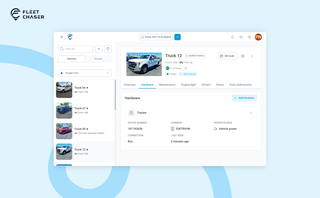
A vehicle now goes into Fleet Chaser in one step, before its tracker arrives. The new Hardware tab connects the tracker or camera later, and the Driver card can check a driver out.

Ever needed to record specific vehicle information that you can’t quite assign to your existing data categories? With notes, important vehicle details are safe in one place, always at your disposal. This can be repair shop inspections, vehicle documents, legal information, etc.

You know where your vehicle is. But do you know what's happening around it?
That's why we introduced the Cameras Overview tab in Fleet Chaser. Now, dispatchers, safety managers, or operations leads can quickly see exactly what's going on - directly through the cameras installed in your vehicles.