



VINs / 1999 / Sterling Truck / L9513 / 2FWYKDYB3XAB47165
1999 Sterling Truck L9513
Vin:
2FWYKDYB3XAB47165
Type:
Truck-Tractor
Year:
1999
Make:
Sterling Truck
Model:
L9513
GVWR:
?

Engine
Manufacturer
Cummins
Model
NTC/N14
Fuel
Diesel
Horse Power
389
Displacement(Liters)
14
Cylinders
6
Cycles
4
Configuration
In-Line
Drive Trian
Type
6x4
Manufacturer
Manufacturer
STERLING TRUCKS (DAIMLER DIVISION)
Plant City
ST. THOMAS
Plant State
ONTARIO
Plant Country
CANADA
Safety Features
Brake System Type
Air
Do you manage a fleet?
FleetChaser will help you track:
- Mileage and maintenance
- Filling and expenses
- Real-time technical condition
Learn More
You'll never want to go back to how your fleet operated before Fleet Chaser
Our construction fleet management software makes your fleet management better, safer, and easier.
Construction and Fleet Management Articles
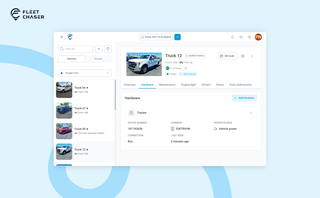
A vehicle now goes into Fleet Chaser in one step, before its tracker arrives. The new Hardware tab connects the tracker or camera later, and the Driver card can check a driver out.

A construction dispatcher fields the same four calls all day — where are you, did you finish, when's the truck coming, which site. None are emergencies, but together they burn about two hours. Here's where the time goes — and the first call to move off the phone.

Fleet management requires the handling and analysis of numerous metrics and variables, which can quickly get out of hand and clutter your desk with piles of hard-to-access information. Compiling reports, communicating with employees, contractors, and drivers, etc., should be intuitive, all laid out in a simple, visual way.
This is where fleet management software comes in.

A well-constructed fleet management strategy is the backbone of profitability and efficiency of any fleet business. Adequate management not only reduces delays by reinforcing organization but also prevents downtime, cutting costs and increasing potential revenue as a result, and ensures your assets are always in top condition.

The last activity view is already in your account. This feature enables you to instantly view info on trucks’ activity in certain locations. No need to search info on the last activity manually: it will be displayed neatly right next to each location’s name. Stay updated and have a nice day ahead!

New Fleet Chaser Cameras experience: faster Playback, recording history by day, and Request video to save clips to Saved media for reliable downloads and proof storage.

Scrub a whole day on a timeline of thumbnails, jump anywhere without the video starting over, cut the minutes you need into a clip you can download — and finally get a straight answer when a camera won't show you live video.

Most "fleet management software" was built for long-haul trucking or service vehicles — construction is the asset-mixed reality in between, and most vendors treat it as an afterthought. Here are the four capabilities that actually matter for a construction fleet, starting with dispatch, plus an honest vendor-by-vendor look at how Samsara, Motive, Fleetio, Verizon Connect, Tenna, and Fleet Chaser handle each.

In 2025, fleet owners face rising costs, pressure from the competition, and stricter regulations. The key to staying ahead is to adapt, not just follow every trend out there. We’ve picked 5 main fleet management trends to help you keep your operations more efficient and competitive. Ready to improve your fleet more? Check out these insights.