



VINs / 2022 / Ford / Explorer / 1FMSK8DH8NGC05321
2022 Ford Explorer
Vin:
1FMSK8DH8NGC05321
Type:
Sport Utility Vehicle (SUV)/Multi-Purpose Vehicle (MPV)
Year:
2022
Make:
Ford
Model:
Explorer
Trim:
XLT
GVWR:
?

Engine
Manufacturer
Ford
Model
EcoBoost
Fuel
Gasoline
Horse Power
300
Displacement(Liters)
2.3
Cylinders
4
Configuration
In-Line
Drive Trian
Type
4WD/4-Wheel Drive/4x4
Manufacturer
Manufacturer
FORD MOTOR COMPANY
Plant Company
Chicago Assembly
Plant City
CHICAGO
Plant State
ILLINOIS
Plant Country
UNITED STATES (USA)
Safety Features
Air Bag Location(Front)
1st Row (Driver and Passenger)
Air Bag Location(Sides)
1st and 2nd and 3rd Rows
Seat Belts(All)
Manual
Brake System Type
Hydraulic
ABS (Antilock Braking System)
Standard
ESC (Electronic Stability Control)
Standard
Do you manage a fleet?
FleetChaser will help you track:
- Mileage and maintenance
- Filling and expenses
- Real-time technical condition
Learn More
You'll never want to go back to how your fleet operated before Fleet Chaser
Our construction fleet management software makes your fleet management better, safer, and easier.
Construction and Fleet Management Articles

Fleet management requires the handling and analysis of numerous metrics and variables, which can quickly get out of hand and clutter your desk with piles of hard-to-access information. Compiling reports, communicating with employees, contractors, and drivers, etc., should be intuitive, all laid out in a simple, visual way.
This is where fleet management software comes in.


Forms is live in the Console, and the questions in it are yours. Write what your business needs to know, point it at the trucks it applies to, and publish.
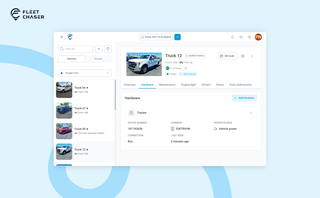
A vehicle now goes into Fleet Chaser in one step, before its tracker arrives. The new Hardware tab connects the tracker or camera later, and the Driver card can check a driver out.

Managing multiple companies can be a challenge, especially when you constantly need to log in and out of different accounts. Previously, Fleet Chaser users were limited to managing just one company at a time. If you worked for more than one company, switching between them required logging out and logging in again, which was time-consuming and inconvenient.

QR Codes are live in Fleet Chaser. Drivers scan a sticker on any vehicle to jump straight into the right inspection — no searching, no typing — and managers link a code to a vehicle right from the Console in seconds.

Fleet Chaser navigation just got an upgrade — dark theme, grouped sections, and a collapsible sidebar with 3 states. Here's what changed and where things moved.

Managing fleets, tasks, and data just got a lot easier! The Fleet Chaser dashboard has been completely redesigned to improve usability and bring a game-changing feature: Customization.

Operating a fleet requires greater-scale management to ensure performance optimization, expense reduction, and efficient cost distribution. Without outlining a budget that keeps track of every expenditure and point of resource consumption, financing and running a fleet business becomes very complicated and unproductive.