



VINs / 2022 / GM / Gm515 / 1HTKHPVM9NH383048
2022 GM Gm515
Vin:
1HTKHPVM9NH383048
Year:
2022
Make:
GM
Model:
Gm515
Series:
GM - Chevrolet Silverado Medium Duty
GVWR:
?

Engine
Manufacturer
GM
Model
L5D
Fuel
Diesel
Displacement(Liters)
6.6
Cylinders
8
Configuration
V-Shaped
Turbocharged
Yes
Drive Trian
Type
4x2
Manufacturer
Manufacturer
INTERNATIONAL MOTORS, LLC
Plant City
SPRINGFIELD
Plant State
OHIO
Plant Country
UNITED STATES (USA)
Safety Features
Brake System Type
Hydraulic
Do you manage a fleet?
FleetChaser will help you track:
- Mileage and maintenance
- Filling and expenses
- Real-time technical condition
Learn More
You'll never want to go back to how your fleet operated before Fleet Chaser
Our construction fleet management software makes your fleet management better, safer, and easier.
Construction and Fleet Management Articles

Fleet Management Software: A Compelling Investment for 2024
Nowadays, fleet management has the potential to be ramped up to unprecedented speeds and simplified, yet it can carry much more complex data and realize sophisticated tasks.
Pen-and-paper fleet management methods have become competitively disadvantaged, if not obsolete.
Innovative fleet solutions are a prerequisite for running a successful fleet — their long list of powerful features and benefits attests to this.
If you were contemplating making the jump to fleet software, let this be a solidifying, factual overview of the solution’s advantages to dispel your doubts.

Managing a fleet is not just about tracking vehicles—it’s about staying informed, reacting instantly to critical events, and making better business decisions. That’s why we are launching the Fleet Chaser Event System, a powerful, customizable tool that lets you create rules tailored specifically to your company’s needs and receive real-time alerts when key events occur.

Forms is live in the Console, and the questions in it are yours. Write what your business needs to know, point it at the trucks it applies to, and publish.

Managing fleets, tasks, and data just got a lot easier! The Fleet Chaser dashboard has been completely redesigned to improve usability and bring a game-changing feature: Customization.
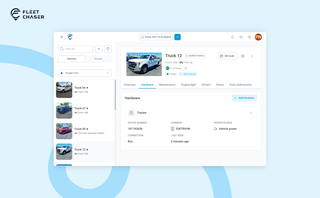
A vehicle now goes into Fleet Chaser in one step, before its tracker arrives. The new Hardware tab connects the tracker or camera later, and the Driver card can check a driver out.

You shouldn't have to stop and figure out where to look for something in Fleet Chaser. You should be able to type its name and be on its page a second later. That's what we rebuilt Search around.
There are two searches now, and they're good at different things.
- Quick Search — the box in the top bar — is for getting somewhere fast.
- Advanced Search is for the times a name isn't enough: when you want to filter a list, search by something other than a name, or pull in archived records.

Operating a fleet requires greater-scale management to ensure performance optimization, expense reduction, and efficient cost distribution. Without outlining a budget that keeps track of every expenditure and point of resource consumption, financing and running a fleet business becomes very complicated and unproductive.

Work doesn’t stop at one team. Transfer in Fleet Chaser hands a task from one workflow to another in a single move, keeping every product, attachment, and activity-log entry attached. No re-typing, no lost history.

Managing multiple companies can be a challenge, especially when you constantly need to log in and out of different accounts. Previously, Fleet Chaser users were limited to managing just one company at a time. If you worked for more than one company, switching between them required logging out and logging in again, which was time-consuming and inconvenient.