


VINs / 2024 / Ford / F-150 / 1FTFW3L53RFA15992
2024 Ford F-150
Vin:
1FTFW3L53RFA15992
Type:
Pickup
Year:
2024
Make:
Ford
Model:
F-150
Series:
XLT
GVWR:
?

Engine
Manufacturer
Ford
Model
5.0L-4V
Fuel
Gasoline
Displacement(Liters)
5
Cylinders
8
Configuration
V-Shaped
Drive Trian
Type
4WD/4-Wheel Drive/4x4
Manufacturer
Manufacturer
FORD MOTOR COMPANY
Plant Company
Dearborn
Plant City
DEARBORN
Plant State
MICHIGAN
Plant Country
UNITED STATES (USA)
Safety Features
Air Bag Location(Front)
1st Row (Driver and Passenger)
Air Bag Location(Sides)
1st and 2nd Rows
Seat Belts(All)
Manual
Brake System Type
Hydraulic
ABS (Antilock Braking System)
Standard
ESC (Electronic Stability Control)
Standard
Do you manage a fleet?
FleetChaser will help you track:
- Mileage and maintenance
- Filling and expenses
- Real-time technical condition
Learn More
You'll never want to go back to how your fleet operated before Fleet Chaser
Our construction fleet management software makes your fleet management better, safer, and easier.
Construction and Fleet Management Articles

In a fast-paced fleet management environment, staying on top of important updates is crucial. That’s why we are introducing Fleet Chaser Notifications—a centralized system designed to ensure you never miss critical alerts while avoiding unnecessary distractions.
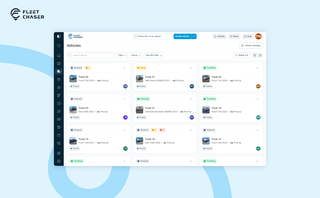
The Vehicles section moves to the new layout: a full-width list you can search and filter, a page for every vehicle, and vehicle groups in one table.

Managing multiple companies can be a challenge, especially when you constantly need to log in and out of different accounts. Previously, Fleet Chaser users were limited to managing just one company at a time. If you worked for more than one company, switching between them required logging out and logging in again, which was time-consuming and inconvenient.

Managing fleets, tasks, and data just got a lot easier! The Fleet Chaser dashboard has been completely redesigned to improve usability and bring a game-changing feature: Customization.

If you manage a large enterprise fleet with hundreds of vehicles, you face the daunting challenge of optimizing operations every day. Your fleet is a critical resource; however, costs can grow exponentially if the right approach isn’t applied. Hence, achieving efficiency is a top priority. The good news is that fleet management software can be your ally in streamlining operations and maximizing productivity.

We’re excited to announce that Fleet Chaser will be at the Charlotte Build Expo 2024 on December 11-12 at the Charlotte Convention Center. This is your chance to connect with us in person and learn how we’re helping SMBs in the construction industry take control of their fleet operations.

We've launched Time Clock, a fully integrated system that lets employees track their time with clarity — and gives managers the tools to approve and manage everything without the guesswork.
Built into both the Employee App and the Console, this feature helps eliminate timesheet chaos and brings structure to your team's day-to-day work tracking.

QR Codes are live in Fleet Chaser. Drivers scan a sticker on any vehicle to jump straight into the right inspection — no searching, no typing — and managers link a code to a vehicle right from the Console in seconds.

Route Planning turns a multi-stop job from "an address typed into the task description" into a real itinerary you draw on a map. Color-coded Load, Delivery, and Job Site checkpoints, drag to reorder, addresses or saved Locations, and an Employee App that walks the driver through the route in order — including the Job Site stops that hold the line until the work there is logged.