



VINs / 2022 / GM / Gm515 / 1HTKHPVM3NH293376
2022 GM Gm515
Vin:
1HTKHPVM3NH293376
Year:
2022
Make:
GM
Model:
Gm515
Series:
GM - Chevrolet Silverado Medium Duty
GVWR:
?

Engine
Manufacturer
GM
Model
L5D
Fuel
Diesel
Displacement(Liters)
6.6
Cylinders
8
Configuration
V-Shaped
Turbocharged
Yes
Drive Trian
Type
4x2
Manufacturer
Manufacturer
INTERNATIONAL MOTORS, LLC
Plant City
SPRINGFIELD
Plant State
OHIO
Plant Country
UNITED STATES (USA)
Safety Features
Brake System Type
Hydraulic
Do you manage a fleet?
FleetChaser will help you track:
- Mileage and maintenance
- Filling and expenses
- Real-time technical condition
Learn More
You'll never want to go back to how your fleet operated before Fleet Chaser
Our construction fleet management software makes your fleet management better, safer, and easier.
Construction and Fleet Management Articles

QR Codes are live in Fleet Chaser. Drivers scan a sticker on any vehicle to jump straight into the right inspection — no searching, no typing — and managers link a code to a vehicle right from the Console in seconds.

The Progress tab is the single place that shows how a task was actually worked — built from real entries drivers create as they go, not a summary someone reassembled later. A per-employee timeline, live per-product totals, and a filterable log of every load and delivery, with every edit kept on the activity log so corrections never erase the truth.

You’ve got all this data coming from your fleet vehicles on maintenance, fuel, and mileage, but it feels like navigating through a maze with no map to guide you. You know tracking the right fleet metrics is crucial, but where do you even begin and what really matters? Read this article to learn about the key KPIs that tell you whether your fleet is on track or heading for trouble.
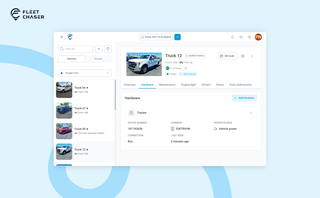
A vehicle now goes into Fleet Chaser in one step, before its tracker arrives. The new Hardware tab connects the tracker or camera later, and the Driver card can check a driver out.

We've launched Time Clock, a fully integrated system that lets employees track their time with clarity — and gives managers the tools to approve and manage everything without the guesswork.
Built into both the Employee App and the Console, this feature helps eliminate timesheet chaos and brings structure to your team's day-to-day work tracking.

Assets is a new Console section for the things that are not vehicles. Give a tool a QR sticker, see where it was last scanned, and let your crew sign it out by filling a form on the phone.

Time Approval now opens a full Session Details view of every shift before you sign off, and the new Pay Period screen turns approved hours into a click-to-pay workflow. Together they cover the whole stretch from clock-out to paycheck — without leaving Fleet Chaser.

Managing operations across fleets and teams can often get tangled in miscommunication or clarity. To solve this, Fleet Chaser's Status Management feature brings clarity and ease to your operations. Whether it's a vehicle needing maintenance or an employee unavailable due to a sick day, statuses provide instant visibility into availability and readiness.

The last activity view is already in your account. This feature enables you to instantly view info on trucks’ activity in certain locations. No need to search info on the last activity manually: it will be displayed neatly right next to each location’s name. Stay updated and have a nice day ahead!