


VINs / 2023 / Nissan / Rogue / JN8BT3BB1PW483039
2023 Nissan Rogue
Vin:
JN8BT3BB1PW483039
Type:
Sport Utility Vehicle (SUV)/Multi-Purpose Vehicle (MPV)
Year:
2023
Make:
Nissan
Model:
Rogue
Trim:
SV
GVWR:
?

Engine
Fuel
Gasoline
Displacement(Liters)
1.5
Cylinders
3
Configuration
In-Line
Drive Trian
Type
4WD/4-Wheel Drive/4x4
Manufacturer
Manufacturer
NISSAN MOTOR COMPANY, LTD
Plant Company
Kyushu Plant
Plant Country
JAPAN
Safety Features
Air Bag Location(Front)
1st Row (Driver and Passenger)
Air Bag Location(Sides)
1st Row (Driver and Passenger)
Seat Belts(All)
Manual
ABS (Antilock Braking System)
Standard
ESC (Electronic Stability Control)
Standard
Other Restraint System Info
Front: 3-Point Manual Belts / Rear: 3-Point Manual Belts (Outboard/Center)
Do you manage a fleet?
FleetChaser will help you track:
- Mileage and maintenance
- Filling and expenses
- Real-time technical condition
Learn More
You'll never want to go back to how your fleet operated before Fleet Chaser
Our construction fleet management software makes your fleet management better, safer, and easier.
Construction and Fleet Management Articles

Compare 8 dispatch platforms for US construction fleets — features, pricing, and which fits a 10-vehicle vs 50+ fleet. Includes Samsara, Fleetio, Procore.


Route Planning turns a multi-stop job from "an address typed into the task description" into a real itinerary you draw on a map. Color-coded Load, Delivery, and Job Site checkpoints, drag to reorder, addresses or saved Locations, and an Employee App that walks the driver through the route in order — including the Job Site stops that hold the line until the work there is logged.

The Employees section moves to the new layout: a list you can filter, a page for every person with their vehicle, forms and hours, and groups in one table.

Scrub a whole day on a timeline of thumbnails, jump anywhere without the video starting over, cut the minutes you need into a clip you can download — and finally get a straight answer when a camera won't show you live video.
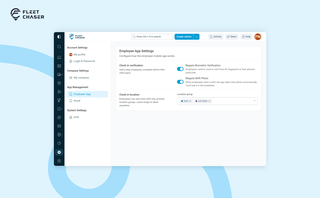
Clock-in checks for the Time Clock: biometric verification, a face-checked shift photo and work locations, with each finding marked in Time Approval.

Geofencing leverages GPS or RFID technology to establish virtual perimeters around physical locations, granting fleet managers meticulous control and invaluable insights. It addresses concerns such as driver behavior monitoring, unauthorized asset use prevention, streamlined administrative tasks, load counting, and improved safety compliance. To gain a comprehensive understanding of the tangible benefits geofencing offers, let's delve deeper into its functionality.

Time Approval now opens a full Session Details view of every shift before you sign off, and the new Pay Period screen turns approved hours into a click-to-pay workflow. Together they cover the whole stretch from clock-out to paycheck — without leaving Fleet Chaser.

Some jobs are too big for one driver. Multi-assignee tasks let you put the whole crew on a single task — each person with their own vehicle, status, and progress — while loads and deliveries are counted automatically into one shared total.